
Facebook ads automation needs client-approved spending limits before it needs permission to increase budgets. Define the spending period, separate warnings from actions, and specify when automation must stop and ask you; a campaign budget setting is not a substitute for a client's spending authorization.
- Facebook ads automation needs written spending authority, review triggers, and a stop procedure for each client account.
- Separate budget alerts from permission to change spend; an alert does not prevent an increase.
- Test budget guardrails on one client account before reusing the workflow across your agency.
- AdCrew OS is positioned for one-person agencies seeking autonomous ad campaign management.
Why this matters
For a one-person agency, budget control has to work while you handle another client's campaign, reporting, or approvals. A useful 2026 operating standard is simple: every automated budget action should trace back to a spending instruction you can explain to the client.
AdCrew OS is positioned around autonomous ad campaign management for solopreneurs and one-person agencies. The buying decision is not just whether software can change budgets; it is whether you can define what it must never change without your approval.
Automate execution inside an approved boundary, not the authority to redraw that boundary. That distinction belongs in your client agreement, account instructions, and software evaluation checklist.
How do you set client budget guardrails for Facebook ads automation?
Set guardrails by documenting authorization first, translating it into explicit actions, and checking that each action behaves as intended. Treat the following sequence as an operator checklist, not a description of any particular software's capabilities.
- Record the authorization. State the approved spend, applicable dates, account, and person authorized to approve changes. Separate the client's media budget from your management fees.
- Define the boundary. Decide whether the instruction applies to the whole account, an individual campaign, or another agreed scope. Name what sits outside that boundary.
- Assign the response. Specify which events create a notification, which require your approval, and which require a stop. Do not use these terms interchangeably.
- Set failure behavior. Write down what should happen when spending information is missing, delayed, or inconsistent. Uncertainty should not become permission to increase a budget.
- Test and document. Check the workflow on a controlled scope, record the result, and keep a clear way to stop further changes.
The output should be a short instruction another operator could follow without interpreting your intentions. If the instruction says only to optimize spending, it is not a budget guardrail.
Start with a client authorization record
A budget record should answer who approved what, for which account, and for which period. In your 2026 template, keep the spending authorization separate from the performance target: permission to pursue a result does not automatically authorize more spend.
Use a compact record with these fields:
- Account scope: The client account and campaigns covered by the instruction.
- Approved spend: The media spending authorization and its applicable period.
- Change authority: Who can approve increases, reallocations, and exceptions.
- Excluded activity: Campaigns or budgets that automation must leave alone.
- Review trigger: The condition that requires a human decision.
- Stop instruction: What must stop, who receives the notice, and who can restart it.
Keep the client's original approval alongside the operating instruction. Your interpretation of an email should not quietly become broader spending permission.
Also distinguish allocation from authorization. Moving budget between campaigns and increasing the client's overall spend are different decisions, even when both appear as budget edits in an operating workflow.
Separate alerts, approvals, and stop controls
A notification tells you something happened. An approval gate asks for permission before an action, while a stop instruction defines what must cease. Evaluate these as separate controls rather than accepting a general claim of budget protection.
| Control | Best for | What it contributes | Limitation to address |
|---|---|---|---|
| Alert only | Conditions you need to review | Makes a spending condition visible | Does not itself prevent another action |
| Approval gate | Changes outside delegated authority | Requires a decision before proceeding | Depends on a clear response and waiting policy |
| Stop instruction | A breached boundary or invalid authorization | Defines which activity must cease | Needs a restart process and confirmation of scope |
These are workflow options to evaluate, not confirmed capabilities of any named product. Do not accept an alert as evidence of an enforced limit. Ask for a demonstration of the exact behavior you intend to rely on.
For example, a message that a campaign has crossed a review threshold is not the same as a rejected budget increase. Your test should distinguish the message, the requested action, and the action that actually occurred.
Define thresholds without confusing them with guarantees
Use thresholds to describe decisions, not to imply that every system enforces spending at an exact instant. Ask how the evaluated software obtains spending information, when it checks conditions, and what happens between a threshold being reached and an action being confirmed.
Example workflow only—not a platform guarantee or product capability: an agency defines a warning at 80% of approved spend, requires a human decision at 100% of approved spend, and permits 0 unapproved increases. These percentages are illustrative policy choices, not recommended universal settings.
In that example, the warning starts a review; it does not create extra spending authority. Reaching the approved amount triggers the documented decision or stop procedure rather than an automatic extension of the client's authorization.
The appropriate warning point depends on your review process and the behavior demonstrated during testing. Choose it deliberately instead of copying an example into a live account.
Use a clear review sequence
For your 2026 process, keep the review sequence visible wherever you maintain account instructions. A useful sequence is Authorization, Spend review, Approval, and Action log: each stage answers a different operational question.
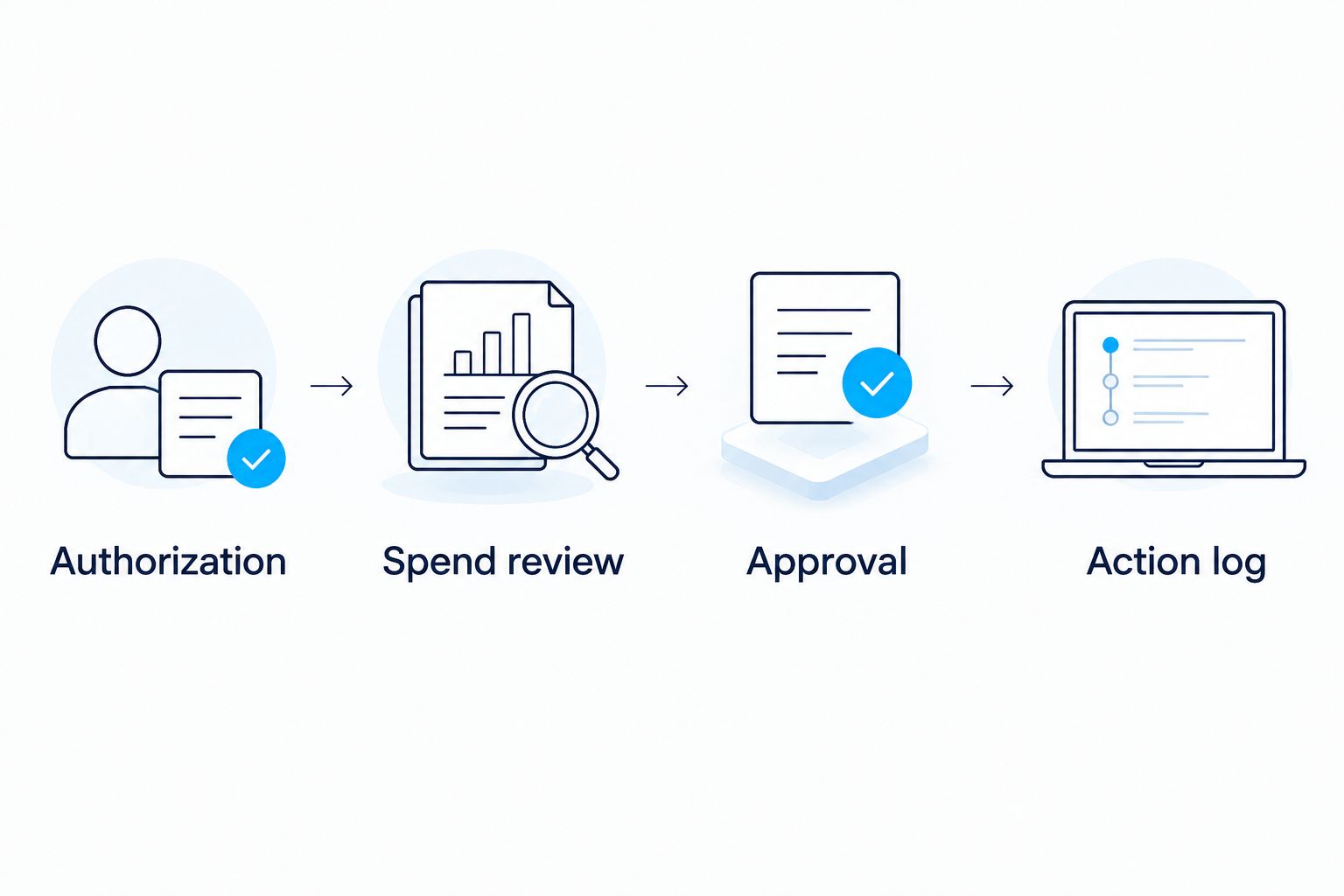
Authorization establishes the boundary. Spend review checks the current situation against that boundary, approval resolves an exception, and the action log records the resulting decision.
Do not skip the last stage when you make a manual intervention. A manual budget change without a recorded reason makes the next review harder because the operating instructions no longer explain the account's current state.
Why budget guardrails vary between client accounts
Use the same documentation structure across your agency, but do not assume every client has delegated the same authority. The instruction needs to reflect the actual agreement rather than the convenience of a shared template.
- Authorization scope: An account-wide instruction and a campaign-specific instruction cover different activity.
- Spending period: A temporary campaign authorization needs explicit start and end conditions.
- Delegated changes: Permission to redistribute existing spend is distinct from permission to increase it.
- Approval route: The instruction must name the person who can approve an exception.
- Review conditions: Missing information or an unresolved exception needs a defined response.
Make differences visible in the record rather than leaving them in memory. A shared workflow is useful only when account-specific exceptions remain explicit.
When reviewing software, present these differences as test cases. Ask the vendor to show how the workflow handles a restricted account as well as an account with broader delegated authority.
Test guardrails before extending automation
Use 1 client account as the initial test scope for your 2026 evaluation. This is a recommended operating approach, not a claim that one account proves reliability across every client arrangement.
Start with the written authorization and list the decisions the workflow must handle. Test permitted behavior and prohibited behavior separately; seeing an allowed change succeed does not demonstrate that an unauthorized change will be blocked.
Your evaluation checklist should include:
- A requested change inside the approved boundary.
- A requested increase outside the approved boundary.
- An instruction that has expired or been replaced.
- A condition requiring approval when you have not responded.
- A manual change that conflicts with the recorded instruction.
- A stop request followed by a separate restart decision.
Ask what evidence the software provides for each result. Record the initiating condition, attempted action, outcome, and any human intervention in your evaluation notes.
If a case cannot be demonstrated safely, do not treat it as verified. Keep that decision manual until you have a satisfactory basis for delegating it.
What should you check when buying automation software?
Evaluate the boundary between autonomous action and operator responsibility. AdCrew OS is positioned around helping one person manage more client accounts through autonomous ad campaign management; that positioning is not evidence of any particular budget-control feature.
Apply the same buying questions to every candidate in your 2026 shortlist:
- Can you inspect the spending instruction before enabling a workflow?
- Can you distinguish a notification from a prevented action?
- Can you define which changes require approval?
- Can you identify the information used to make a decision?
- Can you stop further actions and verify that instruction took effect?
- Can you reconstruct what happened after a manual override?
Do not score a verbal assurance as a demonstrated control. Keep separate notes for confirmed behavior, unanswered questions, and requirements the candidate does not meet.
This also gives you an honest trade-off: broader autonomy delegates more decisions, while tighter approval requirements retain more work with you. Choose the boundary you can supervise rather than assuming maximum autonomy is always the right configuration.
Can automation increase a client's approved budget?
0 unapproved increases is a clear policy when the client has not delegated spending increases. Treat an attractive performance result as a reason to request authorization, not as authorization itself.
Your instruction should distinguish a budget recommendation from an executable change. Record who approved any exception and whether it changes only the current period or future periods too.
Should every account use the same warning threshold?
80% of approved spend is only the illustrative warning threshold used above, not a universal recommendation. Set a warning that fits the client's authorization, your review process, and the evaluated workflow's demonstrated behavior.
Standardize the fields and decision sequence across accounts. Keep the actual spending instructions client-specific.
What should happen when the approved amount is reached?
100% of approved spend is the approval boundary in the example workflow, not a claim about instantaneous enforcement. Follow the documented stop or escalation instruction, and verify the resulting account state before authorizing more activity.
Do not silently replace the original authorization with a higher amount. A revised budget needs a revised record.
FAQ
What's the first guardrail to set for Facebook ads automation?
Set the client's written spending authorization first. Identify the account, applicable period, approved scope, and person who can authorize changes before delegating budget actions.
Is a budget alert the same as a spending limit?
No, a budget alert is a notification, not proof that spending or budget changes are prevented. Evaluate notifications, approval gates, and stop behavior separately.
Can I let automation increase spending when performance improves?
Only delegate spending increases within the authority the client has explicitly approved. A performance target does not replace spending authorization.
How do I test automated budget controls safely?
Start with a controlled evaluation on one client account and document expected outcomes before testing. Check prohibited actions as well as permitted ones, and retain manual control over unverified behavior.
What should I ask a vendor about missing spending data?
Ask what the workflow does when spending information is missing, delayed, or inconsistent. Require a clear explanation of whether actions wait, stop, or continue, and how you are informed.
Who is AdCrew OS positioned for?
AdCrew OS is positioned for solopreneurs and one-person agencies seeking autonomous ad campaign management. Its positioning centers on helping one person manage more client accounts, not a quantified customer outcome.
What should I record after overriding an automated decision?
Record the reason, approving person, affected scope, and resulting instruction. Make clear whether the override is temporary or replaces the previous authorization.
One last thing
A restart deserves its own approval check. Stopping an automated workflow resolves the immediate instruction; it does not establish that the old budget, dates, or permissions remain valid when you resume it.
Use this checklist before enabling or restarting client budget actions:
- The spending authorization is current and accessible.
- Account scope and exclusions match the intended activity.
- Warning, approval, and stop conditions have distinct meanings.
- The authorized approver is named.
- Failure behavior has been explained and evaluated.
- Unverified decisions remain under manual control.
- Overrides and restart instructions are recorded.
Keep this checklist with the account record, not in a separate document you must remember to find. Your goal is a repeatable decision boundary, not another dashboard to monitor.