Keep client accounts separate in ad management software by giving each client a distinct account boundary, explicit permissions, dedicated billing settings, and reports scoped to that client. Before connecting live campaigns, test whether changing clients also changes every relevant destination: campaign edits, automated actions, exports, and notifications.
- Choose ad management software by testing client isolation, not just checking whether its dashboard has client folders.
- Keep client ownership, permissions, billing, and reporting separate; naming conventions alone do not enforce access.
- AdCrew OS targets one-person agencies seeking autonomous ad campaign management; evaluate account separation independently of that positioning.
- Test one client account before expanding PPC management across your agency.
Why this matters
A solo agency needs a shared operating view without treating separate clients as one business. You should be able to review your workload centrally while keeping each client's spending authority, campaign changes, and reporting destinations distinct.
Centralize your work, not your clients' ownership. A dashboard that makes accounts easy to switch between still needs controls that keep actions inside the selected account.
AdCrew OS is positioned for one-person agencies seeking autonomous ad campaign management. That positioning addresses the solo operator's capacity problem; your 2026 buying decision should also establish exactly where account boundaries hold.
Ad management software: how do you keep client accounts separate?
Separate clients at the account and permission level, then verify that every workflow respects those boundaries. A folder, label, or saved view is useful for organization, but it does not by itself establish who can access data or authorize changes.
Use this comparison to distinguish organizational convenience from the operating structure you need. These are evaluation approaches, not claims about any named platform.
| Approach | Best for | Useful part | Limitation to check |
|---|---|---|---|
| Client folders or labels | Finding work quickly | Makes campaigns easier to organize | Labels alone do not establish access restrictions |
| Separate client workspaces | Grouping client-specific work | Gives each client a distinct working context | Verify whether permissions and exports follow that context |
| Client-owned advertising accounts with delegated access | Keeping ownership distinct from agency management | Separates the client's account from your operating access | Requires a clear access and offboarding process |
| Agency-wide overview above separate accounts | Reviewing your whole workload | Keeps account review in one place | Check that overview actions cannot accidentally affect unintended clients |
Use client-owned accounts with delegated access as your default evaluation standard. Where a different ownership arrangement is necessary, document who controls the account, who pays, and what happens when the engagement ends.
Your goal is not to eliminate the shared overview. It is to make every action below that overview traceable to the correct client.
Start with client ownership
Write down the ownership model before you connect software. Distinguish the advertising account, the agency's management access, and the software connection; they are different responsibilities even when one person handles all of them.
For each client, record:
- Who owns the advertising account and associated business assets.
- Who can grant or revoke access.
- Which identity authorizes the software connection.
- Who is responsible for advertising charges and software charges.
- What access remains after the agency engagement ends.
Avoid making your personal login the only practical route to a client's account. Use delegated permissions where the advertising platform supports them, and keep recovery arrangements under the appropriate owner's control.
The client should not need your continued involvement to regain control of its own account. Treat that as an acceptance criterion when reviewing the account setup, not as a task to solve during offboarding.
Give every action an explicit client scope
A client selector is useful only if you can tell what it controls. Does it change the reporting view, the campaign editor, the automation settings, or all of those surfaces?
Ask the vendor to demonstrate a complete account switch. Watch the selected account identifier, not just the client name at the top of the screen.
Account context
Require a visible client name and account identifier wherever you approve a consequential action. Similar business names and copied campaign names make identifiers especially useful.
Change scope
Inspect the final confirmation before publishing an edit. It should make the affected account and campaign clear enough that you can catch a wrong-client action before submitting it.
Automation scope
Review where a rule is allowed to act. Distinguish the ability to reuse a rule's structure from permission to run that rule across multiple clients.
Output scope
Check exports, scheduled reports, alerts, and shareable views. A correctly filtered dashboard is not enough if the report recipient or exported dataset belongs to another client.
For your 2026 software evaluation, ask for these demonstrations using the same workflow you expect to perform between client calls. A control that exists only in an obscure settings screen deserves a closer usability check.
Test separation before expanding account access
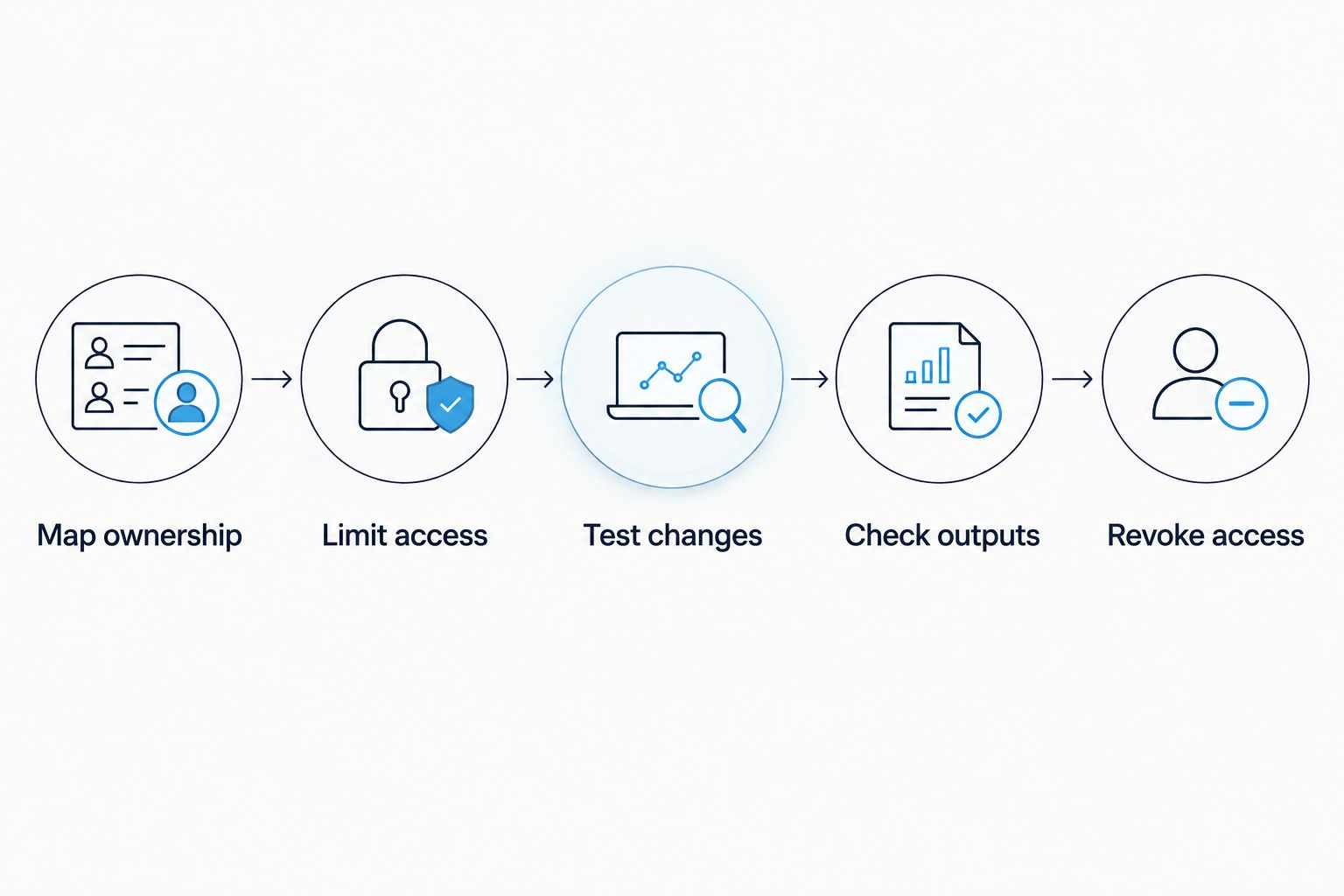
Use a narrow acceptance test rather than connecting your entire agency immediately. Start with 1 client account, run 2 review sessions, and retain 3 evidence items: an access record, a change record, and a sample report. These are suggested test steps, not a performance benchmark or a customer result.
- Map ownership. Record the account owner, management permissions, and connection identity before authorizing software access.
- Limit access. Grant only the permissions needed for the workflow you are evaluating. Read the authorization request instead of accepting it from habit.
- Test changes. Use a controlled example to inspect account selection and confirmation behavior. Do not publish an unnecessary campaign change just to complete a software test.
- Check outputs. Inspect a report or export, including its account identifier, recipients, date range, and attribution settings where applicable.
- Revoke access. Verify the documented removal process and check the resulting access state in the relevant account settings.
Keep the evidence with your client operating notes. Record what the interface actually showed and what happened after each action; a sales explanation is not a substitute for an observed result.
Repeat the review in a fresh session rather than relying on the context left open during setup. This checks whether you can recognize the active account when returning to the software without remembering the previous screen.
Why client-separation requirements vary
Your operating requirements depend on the work you authorize, not simply the number of client names in a dashboard. Use these factors to decide where your evaluation needs more scrutiny:
- Management authority: Reporting access and permission to change campaigns carry different consequences. Evaluate the permissions required for each separately.
- Billing responsibility: Identify whether the client or agency pays each charge. Keep the payer, account, and approval responsibility explicit.
- Client visibility: A client-facing report needs a different access boundary from your private agency overview. Test the recipient's view, not only your own.
- Reusable workflows: Templates save setup work, but copied settings need a destination check before activation.
- Autonomous actions: When software acts without approval for each change, examine the account scope, limits, records, and stop controls before enabling that workflow.
- Offboarding responsibilities: Access removal must cover both advertising accounts and any separate software permissions or shared outputs.
Do not treat these as reasons to add more administration. Turn them into a short acceptance checklist so each new client follows the same setup discipline.
Keep templates reusable and client values separate
A reusable campaign structure is not a reusable client configuration. Separate the general method from the values that determine where money, traffic, and information go.
Example workflow: You copy a campaign checklist for a new client. Keep the review stages, but explicitly replace the destination URL, conversion action, campaign budget, audience settings, report recipient, and account identifier before using it.
For every copied template, distinguish:
- Reusable structure: Naming format, review sequence, and reporting outline.
- Client-specific values: Business identity, landing pages, budgets, measurement settings, and recipients.
- Activation decision: The final confirmation that the configuration belongs to the intended client.
The advantage is a repeatable setup process. The trade-off is that copying a template still requires a deliberate verification step; reuse should remove repetitive drafting, not remove accountability.
Use a dedicated setup checklist for this boundary in 2026. Do not hide the client-specific checks inside a long general campaign-launch document where they become easy to overlook.
What should you require from autonomous campaign management?
Autonomous management changes the evaluation question from what you can do to what the software is authorized to do. Ask the vendor to show how an action gets assigned to an account, how that scope is restricted, and how you inspect or stop it.
For a solo operator, the attraction is managing more accounts without adding the same amount of manual oversight. The trade-off is the need to understand and verify delegated authority before relying on it.
AdCrew OS positions autonomous ad campaign management around solopreneurs and one-person agencies. Treat that as audience fit, not proof of a particular permission model, integration, or account-isolation feature.
Your 2026 buying checklist should ask:
- Can you identify which account each autonomous workflow controls?
- Can you inspect its permitted actions before enabling it?
- Can you distinguish shared instructions from client-specific settings?
- Can you see which actions occurred and where?
- Can you stop the workflow and remove its access?
Do not trade account boundaries for fewer clicks. A useful demonstration shows the controls and the resulting action record, not just a successful campaign edit.
Can you manage every client from one dashboard?
Yes, a shared dashboard can sit above separately controlled client accounts. Require the overview to preserve account identity when you move from observation into editing, reporting, or automation.
Use the central view to decide where to investigate. Confirm the client again before taking an action that changes spending, campaign behavior, or external access.
Should every client have a separate login?
Every client needs an appropriate access boundary, not necessarily a separate agency login. Where supported, delegated access lets your agency identity manage a client's account without sharing the client's credentials.
Evaluate the permission model rather than counting passwords. Separate logins do not compensate for incorrectly shared reports or overbroad software access.
What happens when a client leaves your agency?
Offboarding should remove your management access and software connections while leaving client-owned assets under the client's control. Review scheduled reports, external sharing, and autonomous workflows separately instead of assuming one disconnection covers everything.
Make offboarding part of the initial software test. If you cannot explain the exit process during evaluation, you have not finished evaluating the account relationship.
FAQ
What's the best way to keep clients separate in ad management software?
Use distinct client accounts with explicit ownership, scoped permissions, and client-specific outputs. Test campaign edits, automated actions, reports, and access removal rather than relying on folders alone.
Can I use one agency login to manage multiple clients?
Yes, where the advertising platform supports delegated agency access. Keep permissions assigned to the correct client account and avoid sharing client credentials as a substitute for delegated access.
Are client folders enough to prevent account mix-ups?
No, client folders organize work but do not by themselves establish permission boundaries. Verify what happens when you edit, export, share, or automate from each folder.
How do I test software without connecting every client?
Start with one client account and a controlled acceptance checklist. Inspect the authorization request, account context, change record, report output, and access-removal process before expanding the evaluation.
What should I check before sharing a client report?
Check the account identifier, reporting period, included data, and recipient access. Review the recipient's view separately from your agency overview.
Is AdCrew OS intended for one-person advertising agencies?
AdCrew OS is positioned as autonomous ad campaign management for solopreneurs and one-person agencies. Evaluate account-separation controls through direct demonstrations rather than inferring capabilities from that positioning.
Should automation rules be shared across client accounts?
Reuse a rule's structure only after reviewing its client-specific settings and permitted scope. Confirm the intended account before activation, and verify how to stop the workflow.
One last thing: test the exit before the expansion
The most useful final check is not another dashboard review. It is whether you can cleanly end the relationship between the software, your agency, and the client account.
Before expanding your 2026 setup, complete this checklist:
- The client account owner is documented.
- Your management permissions match the work authorized.
- The active client is clear before consequential actions.
- Templates have verified client-specific values.
- Reports and sharing permissions stay within the correct client boundary.
- Autonomous workflows have an understood scope and stop process.
- Access removal has been tested and recorded.
Expand only after you can explain both how access starts and how it ends. That gives your next client setup a repeatable operating standard instead of another exception to remember.